
As I prepare for my AWS Certified Solution Architect Exams. I’ve decided to document my learning journey. So what better way to write out some of my learning notes here. This is where I get to display my current understanding as well as prompt a discussion for anything I might need help with. As well as hopefully helping anyone else looking into the same topic, with that out if the way lets pick up the first topic.
What is Amazon S3?
Amazon S3 - Simple Storage Service
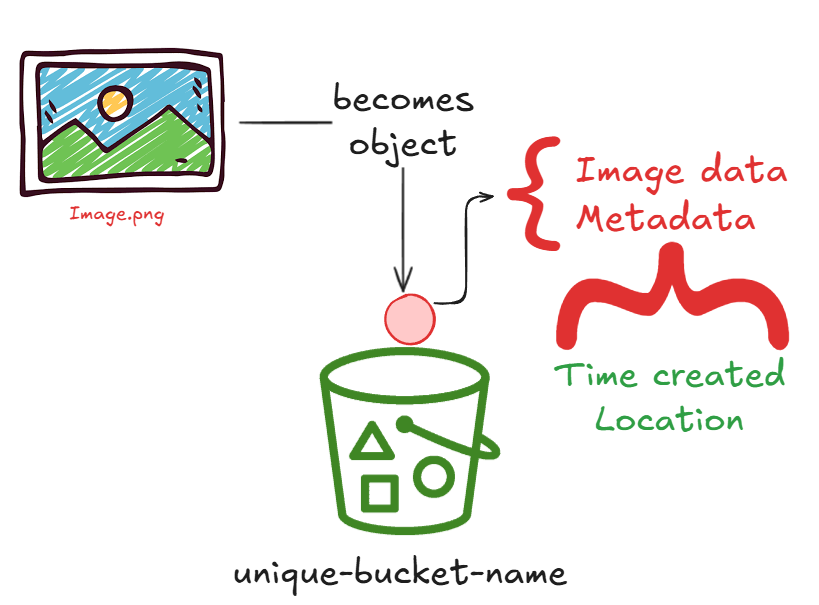
We’re going to take the opportunity to deep dive into S3 buckets. They are what I’d call a major component of AWS as they server more than just he basic function of allowing you to store data on the AWS platform. At a surface level though S3 buckets I would liken to a folder on your desktop, somewhere that you can store a range of files and folders. S3 buckets have their own terminology.
| Buckets | These are the top level containers within Amazon S3 – Think of these as your root folder |
| Objects | Individual items that are stored within the Buckets |
Objects are items which you can store in an S3 bucket and consist of both Data (The file itself) & Metadata (Information about the file). All Objects can also be uniquely identified with a unique Key.
S3 Core Features
So you’ve got an S3 bucket, what can you do with it and what dose it offer!
- Scalability
- Data Availability
- Security
- Performance
What can they be used for?
- Static Hosting Websites: Host high-speed websites without needing a web server
- Mobile Apps
- Enterprise Apps
- Backup & Restore: Reliable off-site storage for critical data.
- Archive: Long-term storage for legal or regulatory requirements.
- IoT devices: Storing user-generated content like photo and videos
- Big data analysis: Storing massive datasets for AI and machine learning
As you can see there is quite a range of usability with an Amazon S3 bucket but lets take a closer look at some of the items I’ve expressed above.
S3 buckets are a great way to meet fluctuating demands for a project here are a few of the core features.
- Designed for 11 9s (99.99999999999%) data durability this means that with some core features it allows for data to be available 99.99999999999% of the time thanks to having the ability to store objects across multiple availability zones [ az-a | az-b | az-c ]. This helps protect against failures, errors and threats
Think of it as if you had 10,000,000 objects in an S3 bucket you can expect to lose a single object once every 10,000 years. Availability zones help reduce the chance of lost data.
- Offers leading security, compliance and audit capabilities
- Secure from unauthorised access which includes the following capabilities:
- Encryption features: at both data rest and in transit
- Access Management tools: Allowing granular control using IAM policies and Bucket Policies
- Ability at the bucket or the account level to block public access with S3 block public access
- This is a feature that you should ensure is enabled by default that you don’t want to be public. Helping protect against data leaks.
- S3 buckets are compliant with the following: PCI-DSS, FedRAMP, HIPAA/HITECH, FISMA, EU Data Protection Directive
- Auditing capabilities for any access requests to any S3 resources
Getting Setup
So you’re looking to take your first steps to move to Amazon AWS and want to find help or an easy solution to start moving over. This is where the AWS Partners Network [APN] can help.
- AWS Partners network [APN] – is the largest community of technologies and consulting service providers.
- Migration partners can help you transform data to Amazon S3
- Storage partners have integrated solutions for
- Primary Storage
- Backup and Restore
- Archive
- Disaster Recovery
- Can get an Integrated solution from AWS marketplace boasting over 250 Storage solutions.
What’s next?
This is just the tip of the S3 iceburg, in my next post we’ll be looking at the S3 Storage Classes (like Intelligent-Tiering and Glacire) and how they can help you save on your AWS bill.